
Content
What is Payday Super?
What This Means for Your Business?
Summary of Changes
What is SuperReady & How it Works?
Payment Flow: Before and After Payday Super
ATO Compliance Approach - First Year
Your Action Checklist - Complete Before 1 July 2026
Member Super Health
SuperReady Updates Across the System
Need Help?
Glossary
Action Required Before 1 July 2026
From 1 July 2026, all Australian employers must pay superannuation on every payday - not quarterly. This article explains what is changing, how EOH supports you through SuperReady, and the steps you need to complete before the deadline.
What is Payday Super?
Payday Super is a change to Australian superannuation law that requires employers to pay superannuation contributions on each payday, rather than quarterly.
Under the current rules, employers must pay SG contributions to a super fund within 28 days after the end of each quarter. From 1 July 2026, that changes: super must be paid on every payday and received by the super fund within 7 business days.
Key Date
1 July 2026 - Payday Super becomes mandatory for all Australian employers.
This change is designed to ensure employees receive their super more regularly - and to give the ATO greater visibility over compliance in real time.
What This Means for Your Business?
Cash flow and payroll timing
The most significant operational impact is frequency. Instead of making four super payments per year, you will now make a super payment every time you run payroll. For businesses running weekly payroll, that is up to 52 payments per year.
This affects cash flow planning - super funds must be available at the time of each pay run, not accumulated over a quarter. We recommend reviewing your payroll funding process with your finance team ahead of 1 July 2026.
How super is calculated is also changing
The contribution base changes from Ordinary Time Earnings (OTE) to Qualifying Earnings (QE). QE is broader - it includes OTE, salary sacrifice contributions, and certain other amounts. You will also need to report both QE and super liability through Single Touch Payroll (STP), where currently only one or the other is required.
Your EOH configuration settings for pay components (allowances, additions, deductions, member shifts) must be reviewed to ensure they are correctly flagged for QE. See the Action Checklist section for details.
Important - QE settings are your responsibility
Superannuation is calculated based on your configuration settings in EOH. The Xeople team is available to assist with system configuration however, advice is general in nature. Ensuring configuration and settings are accurate is your responsibility - contact support@xeople.com with any queries.
Mandatory member validation before contributions
From 1 July 2026, you cannot process a super contribution for an employee until their super fund details have been validated via a Member Validation Request (MVR). This is an automated check performed by EOH through Ozedi. If an employee's details are not validated, they will appear as 'Not Ready' in the system, and contributions cannot be processed for them.
Note: Not all super funds will support MVR by 1 July 2026. EOH automatically identifies eligible funds and handles the request accordingly.
Stapled fund lookup becomes mandatory
Previously, checking whether a new employee had an existing 'stapled' super fund was optional. From 1 July 2026, this lookup is mandatory. If a stapled fund is found, it must be presented to the employee alongside other available options during super fund selection. This process is automated via the Entire OnHire Flare integration.
To enable this, you must authorise Flare to access the ATO's stapled fund lookup service via the ATO Access Manager. Entire recommends that this be completed by 1 June 2026. See the Action Checklist for steps & links.
SBSCH is being decommissioned
If you currently use the Small Business Superannuation Clearing House (SBSCH) to pay super contributions, you must transition to an alternative clearing house before 1 July 2026. The SBSCH is closed to new users from 1 October 2025 and will be fully decommissioned on 30 June 2026.
Summary of Changes
The table below compares how superannuation works today against the new requirements from 1 July 2026.
|
Area |
Current Process |
From 1 July 2026 |
|
Payment deadline |
SG contributions must be received by the super fund within 28 days after the end of each quarter. Due dates: 28 October, 28 January, 28 April, 28 July. |
SG contributions must be made on each payday and received by the super fund within 7 business days. Extended deadlines apply for new employees (20 business days) and in exceptional circumstances approved by the ATO. |
|
Super calculation base |
12% of Ordinary Time Earnings (OTE). |
12% of Qualifying Earnings (QE). QE includes OTE, salary sacrifice contributions, and certain other payments. |
|
STP reporting |
Report either OTE or super liability through STP. |
Report both QE and super liability through STP. |
|
Late payment penalty (SGC) |
SGC applies if contributions are not received within 28 days after the quarter end. Assessed by employer self-assessment. Based on salary and wages. Interest at 10% p.a. Flat admin fee. Not tax deductible. |
SGC applies if contributions are not received within 7 business days of payday. Assessed by the ATO. Based on QE. Interest compounded daily at the General Interest Charge (GIC) rate. Administrative uplift may apply. Tax deductible. |
|
Maximum penalty |
Up to 200% of the SGC, which may be remitted in part or full. |
25% or 50% of unpaid SGC, depending on compliance history. |
|
SBSCH |
Available to existing users until 30 June 2026. Closed to new users from 1 October 2025. |
No longer available. |
|
Member validation (MVR) |
Not required. |
Mandatory before any super contribution can be processed. EOH performs this automatically via Ozedi. |
|
Stapled fund lookup |
Optional during onboarding. |
Mandatory for businesses using Flare during onboarding. Must be presented to the employee if found. |
What is SuperReady & How it Works?
SuperReady is the EOH feature set that supports your compliance with Payday Super. It handles super calculation, member validation, fund selection, reporting, and (coming soon) automated contribution payments - all within your existing EOH workflow.
Here is how the end-to-end process works once SuperReady is configured:
Step 1 - Configure super settings - Click here for more details.
Set up your Employer Payroll Profile and SuperReady Configuration Settings within EOH. This includes your organisation details, super fund identifiers, and which compliance features are active (e.g., TFN Declaration, Stapled Fund lookup). Each legal entity you use for hiring must be registered separately.
Step 2 - Register with Ozedi and Flare - Click here for more details.
Ozedi handles automated MVR/MRR compliance checks. Flare handles TFN Declaration submissions to the ATO and stapled fund lookups. Both registrations are completed within EOH. An Ozedi Client ID is generated upon successful registration.
Step 3 - Validate member super details (MVR/MRR) - Click here for more details.
Before a super contribution can be processed, EOH automatically sends a Member Validation Request (MVR) to the relevant super fund to confirm the employee's details are correct. For new employees joining your default fund, a Member Registration Request (MRR) is sent instead. The system updates the employee's SuperReady Status to 'Ready' or 'Not Ready' based on the fund's response.
Note: Not all super funds will support MVR requests by 1 July 2026. The Entire OnHire system automatically identifies eligible funds and sends requests accordingly when super fund details are saved. Based on the super fund response (accept/reject), the system automatically updates the member/ applicant SuperReady Status to Ready / Not Ready.
Step 4 - TFN declaration and super fund selection - Click here for more details.
During onboarding, employees submit their TFN Declaration to the ATO via the Applicant Portal or Workforce App (powered by Flare). The system then retrieves and displays the employee's stapled fund (if one exists) alongside other fund options for them to choose from.
Step 5 - Super calculation on Qualifying Earnings - Click here for more details.
For each pay run, EOH calculates super based on QE as configured in your pay component settings. This includes all additions, deductions, allowances, and member shift components flagged as QE-applicable.
Step 6 - SuperReady reports - Click here for more details.
At the end of each payroll week, SuperReady reports provide a summary of super contributions due. These can be exported and imported into your existing clearing house for payment processing.
Step 7 - SuperReady Status of Member/Applicant - Click here for more details.
Shows whether a member/applicant is ready for super processing based on successful MVR/MRR compliance checks and valid super fund details.
Automated super payments - coming soon
The SuperReady Auto feature will eventually automate the submission and processing of super payments directly to super funds. Until this feature is available, clients must continue using their existing clearing house for super payments. Click here for more details.
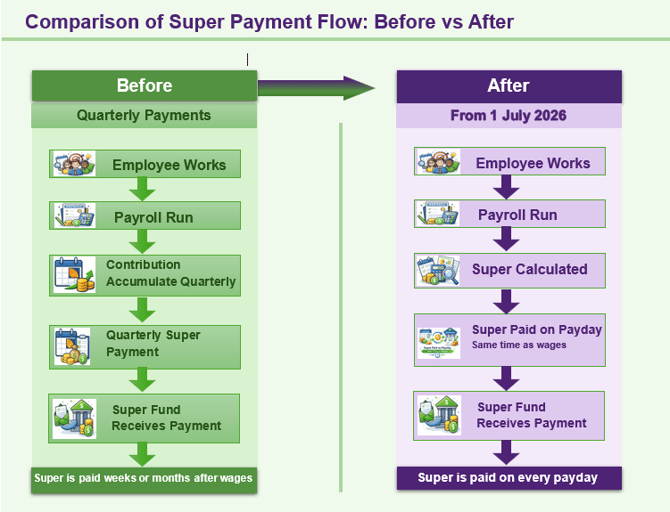
Payment Flow: Before and After Payday Super
The diagram below illustrates how super payment timing is changing.
|
CURRENT - Quarterly payments - Pay run occurs |
FROM 1 JULY 2026 - Payday payments - Pay run occurs |
ATO Compliance Approach - First Year
The ATO has confirmed its compliance approach for the first year of Payday Super (1 July 2026 to 30 June 2027). In summary:
Employers who are genuinely trying to comply and who resolve issues quickly will not be the primary focus of ATO compliance action during this transition period. However, this is not a grace period - the new rules apply from 1 July 2026, and the SGC will apply to late or missed payments.
ATO guidance
The ATO's compliance approach documentation is available on the ATO website. Search 'Compliance approach for first year of Payday Super finalised' and 'The new super guarantee charge' on ato.gov.au for the latest details.
Your Action Checklist - Complete Before 1 July 2026
You have configuration tasks to complete in EOH before Payday Super takes effect. Work through these in order, as some steps depend on earlier ones being complete.
|
# |
Action |
Link |
Deadline |
Status |
|
1 |
Configure your Employer Payroll Profile in EOH for each legal entity (Organisation & Payroll, Contact & Address, Super Fund Identifier sections). |
Before 15 June 2026 |
|
|
|
2 |
Complete SuperReady Setup & Authorisation in EOH for each entity, including enabling required feature flags (SuperReady, TFN Declaration, Stapled Fund lookup). |
Before 15 June 2026 |
|
|
|
3 |
Register each entity with Ozedi (via EOH) to enable MVR/MRR compliance checks. An Ozedi Client ID will be generated on completion. |
Before 15 June 2026 |
|
|
|
4 |
Register with Flare (via EOH) to enable TFN Declaration submissions and stapled fund lookups via the Applicant Portal and Workforce App. |
Before 15 June 2026 |
|
|
|
5 |
Review and update super configuration in Master Settings - check Additions & Deductions Master, Allowances Master, and Member Shifts Master to ensure all components are correctly flagged for QE. CAUTION: Please ensure these settings are carefully reviewed and confirmed, as they directly affect Qualifying Earnings (QE) calculations and superannuation payments. These configurations are your responsibility (the client). |
Before 15 June 2026 |
|
|
|
6 |
Register your SSID (Software Service ID) with the ATO to enable STP submissions and super reporting compliance. |
Before 31 May 2026 |
|
|
|
7 |
Authorise Flare to access the ATO stapled fund lookup service via the ATO Access Manager. This must be completed before 1 July 2026 to avoid disruption to employee onboarding. |
Before 5 June 2026 |
|
|
|
8 |
Existing members will initially display a Super Status of ‘Not Ready’. Set members to ‘Ready’ manually where super details are already confirmed based on previous payment history. |
Before 1 July 2026 |
|
|
|
9 |
If you use SBSCH, transition to an alternative super clearing house. SBSCH is decommissioned from 1 July 2026. |
|
Before 5 June 2026 |
|
Before updating QE settings
Changes to superannuation flags in Master Settings directly affect how contributions are calculated. Review carefully with your payroll team and confirm before saving. The Xeople team is available to assist - contact support@xeople.com.
Member Super Health
Once SuperReady is active, a Member Super Health dashboard will provide you with a full overview of your workforce's super compliance status, including MVR/MRR outcomes, Super Status, and TFN declarations.
All existing members will initially appear with a Super Status of 'Not Ready'. You should set members to 'Ready' manually where you know their super details are correct based on previous payment history. From 1 July, the SuperReady Status is automatically updated when a member's or applicant's super fund details are saved or updated in the application, provided you have opted for MVR and/or MRR compliance services.
🔗Click here for Bulk Members/ Applicants SuperReady Status Update.
🔗Click to view the detailed Member Super Health article.
SuperReady Updates Across the System
Payday Super changes have been rolled out across all EOH portals and apps. Refer to the linked articles for details on what has changed in each area:
- Payday Super Readiness Checklist
- SuperReady Activation Scenarios and System Behaviour
- Staff Portal - SuperReady Updates
- Finance Portal - SuperReady Updates
- Applicant Portal - SuperReady Updates
- Workforce App - SuperReady Updates
- Member Super Health
- Fund Validation Service
- SuperReady Auto - Contribution Payment Process (feature coming soon)
Need Help?
The Xeople support team is available to assist with any SuperReady configuration queries. Reach out via:
- Email: support@xeople.com
- Knowledge Base: SuperReady Articles
We strongly recommend completing all checklist items as early as possible. With less than two months to the deadline, early action gives you time to troubleshoot any issues before 1 July 2026.
Glossary
The following terms are used throughout this article.
|
Term |
What it means |
|
ATO |
Australian Taxation Office - the federal body responsible for superannuation compliance and reporting. |
|
EOH |
Entire OnHire - the workforce management platform you use to manage payroll and super. |
|
Flare |
A third-party service integrated with EOH for TFN declarations and stapled fund lookups. |
|
MVR |
Member Validation Request - an automated check that verifies an employee's super fund details before any contribution is made. |
|
MRR |
Member Registration Request - an automated process to register a new employee with your default super fund. |
|
NPP |
New Payments Platform - a modern Australian payment rail enabling near real-time bank transfers. |
|
OTE |
Ordinary Time Earnings - the base measure used for calculating super under the current rules (before 1 July 2026). |
|
Ozedi |
A third-party compliance provider integrated with EOH for MVR/MRR checks. |
|
QE |
Qualifying Earnings - the new measure for calculating super from 1 July 2026. Includes OTE plus salary sacrifice and certain other payments. |
|
SBSCH |
Small Business Superannuation Clearing House - a government service being decommissioned. No longer available from 1 July 2026. |
|
SG |
Superannuation Guarantee - the minimum super contribution rate employers must pay. Currently 12% of QE. |
|
SGC |
Super Guarantee Charge - the penalty applied when super is paid late or incorrectly. |
|
SSID |
Software Service ID - a unique identifier you must register with the ATO to submit STP reports. |
|
STP |
Single Touch Payroll - the ATO's real-time payroll reporting system. |
|
TFN |
Tax File Number - an employee's unique tax identifier, required for super fund registration. |
|
Stapled Fund |
An employee's existing super fund that follows them from job to job. Employers must now look this up and present it during onboarding. |