
Content
SuperReady Auto
The SuperReady Auto feature enables automatic transfer of super contributions directly to member super funds via Ozedi integration. It helps maintain workforce superannuation compliance. This feature will be available soon, stay connected.
Until this feature becomes available, and once Payday Super is effective from 1 July 2026, clients who wish to opt for this feature must continue using their existing super payment processes and clearing house.
You can use the new SuperReady reports available in the Finance portal to support export/import into the existing clearing house for super payments. Click here for more details about SuperReady Reports.
If you wish to opt for this feature, please contact our Xeople Support team or your Relationship Manager. Once the feature is available, you will be able to process super contributions through Entire OnHire.
Ozedi — Compliance & Payment Setup
The Ozedi – Compliance & Payment Setup section within Provider Registration & Payment Setup allows you to configure Payment Method & Bank Authority and Refund Bank Details. When the SuperReady Auto feature is available, these settings must be completed before super contributions payment processing via Entire OnHire.
How to Access Provider Registration & Payment Setup?
To access Provider Registration & Payment Setup:
- Click Finance → SuperReady.
- Click the Configuration Settings icon and select the Provider Registration & Payment Setup tab.
In this section, you can complete the following required setup steps:
- Payment Method & Bank Authority: Payment method and bank authority are required for electronic super contribution transfers via Entire OnHire.
- Refund Bank Details: Provide the bank account where super fund refunds will be deposited for this entity. This is separate from your payment account and is used solely for receiving returned contributions.
Payment Method & Bank Authority
The Payment Method & Bank Authority section allows you to configure the payment method based on the selected Payment Provider.
Key Considerations for Clients
- Clients must select an appropriate Contribution Method (e.g., Zepto or RewardPay) during setup.
- These options support compliance with SuperReady requirements, particularly timely contribution payments.
- Once a payment provider is selected and saved, it cannot be modified. If you need to update the selected payment provider, please contact the Xeople Support team.
Instant Payments via NPP (Zepto Integration)
OZEDI enables contribution payments through the New Payments Platform (NPP) via its integration with Zepto. Payments are processed using PayTo Agreements, allowing near real-time, confirmed transactions.
Once funds are received, OZEDI immediately distributes contributions to the respective super funds. OZEDI does not hold client funds.
If NPP is not available for the receiving account, payments are processed via BECS to ensure delivery.
Credit Card Payments (RewardPay Integration)
OZEDI also supports super contribution payments via its integration with RewardPay.
- Payments can be made using American Express, Mastercard, or Visa.
- OZEDI does not store or hold any credit card details, ensuring secure processing.
Zepto Payment Provider
Zepto offers two payment methods:
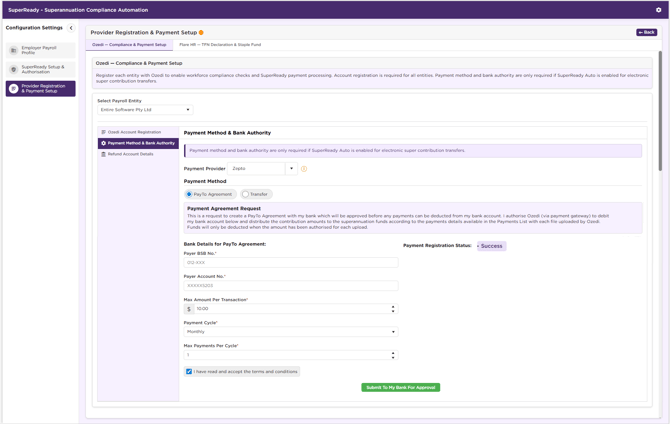
- Zepto - PayTo Agreement
- Zepto Transfer
1. Zepto - PayTo Agreement
A PayTo Agreement authorises OZEDI (via Zepto) to collect payments directly from your nominated bank account within defined limits.
The New Payments Platform (NPP) is relatively recent. While some banks support PayTo, not all have fully implemented PayTo agreements for business accounts. In addition, not all super funds are currently enabled to receive payments via PayTo.
Adoption is ongoing, so we recommend confirming with your bank whether a PayTo agreement can be established for the required bank account.
How to Setup PayTo Agreement?
To setup PayTo Agreement, provide:
- Payer BSB No. - This is a 6-digit BSB (Bank–State–Branch) number that identifies the payer’s bank and branch.
- Payer Account No - This is the Payer Account Number. Payments for the super funds will be deducted from this account after authorisation is approved.
- Max Amount Per Transaction - The maximum amount that can be paid in a single transaction. Must be between 1.00 and 10,000,000.00 (inclusive). If not specified, the default value 10,000,000.00 is applied.
Note: This is the maximum that can be withdrawn from your account to cover the superannuation payments in a single upload. If the total super payment in the upload exceeds this limit, no money will be withdrawn, and the payments will fail.
- Payment Cycle - Select the payment frequency as Monthly, Quarterly, or Annual.
This determines the period during which the maximum payment per cycle limit applies. This field is mandatory for PayTo. - Max Payments Per Cycle - Specify the maximum number of payments allowed within a payment cycle. Must be between 1 and 999 (inclusive). If not specified, the default value 999 is applied.
Note: This defines how many times superannuation payments can be made within the selected cycle. Allow for regular and irregular payments (missed, delayed, or additional payments).
- Select the ‘I have read and accept the terms and conditions’ checkbox.
- Click Submit To My Bank For Approval.
Note: All mandatory fields are marked with an asterisk (*) on the screen.
Once submitted successfully, the Payment Registration Status will display as Active.
Client Action Required
- A PayTo request is sent to your bank after submission.
- You must review and approve the agreement via their online banking.
- Payments can proceed only after the agreement is approved.
How does PayTo Agreement Work?
- Enter bank details and payment limits in the system.
- A PayTo request is sent to your bank.
- You will receive a notification in your online banking.
- Review and approve the agreement before any funds can be deducted.
- The bank sends the agreement status back to the system:
- Approved → Payments proceed.
- Rejected/Failed → Status and error details are returned for review.
No funds will be deducted from your account until the PayTo Agreement has been successfully authorised.
Zepto Transfer
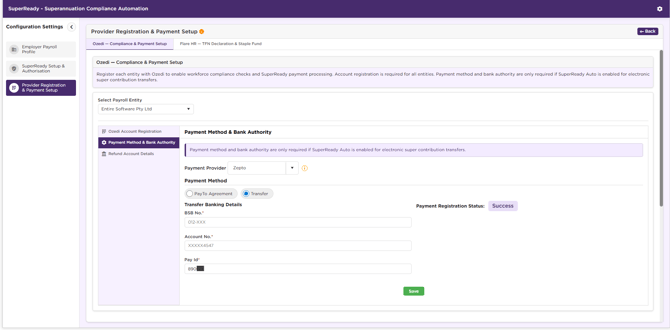
Zepto Transfer allows you to manually transfer super contribution funds to a client-specific bank account or PayID provided by OZEDI.
Each client is assigned a unique virtual account under OZEDI’s Zepto clearing account. This account is used to receive and match contribution payments before processing.
Once funds are received and matched, OZEDI automatically distributes the contributions to the relevant superannuation funds via the New Payments Platform (NPP).
How does Zepto Transfer Work?
- A transfer request is initiated using the system.
- OZEDI generates unique bank account details or PayID for the client.
- Transfer the exact contribution amount to the provided account or PayID.
- Funds are received into the client-specific account.
- OZEDI matches the received amount with the uploaded contribution file.
- Once matched, contributions are distributed to the relevant super funds.
The bank account details may take a few minutes to appear after the request is initiated.
Important Notes:
- The transfer amount must exactly match the amount in the uploaded contribution file for successful processing.
- Contribution processing begins only after funds are received and successfully matched.
- The generated bank account or PayID details may take a few minutes to appear after the request is initiated.
- Settlement time depends on the payment method:
- NPP payments: Near real-time processing.
- BECS payments: May take several hours to days to clear.
- This method provides full control to the payer, as payments are initiated manually.
- Occasionally, superannuation funds may return money (known as an unsolicited return). When this occurs, Ozedi will return the funds to the original account used for the transfer.
When to Use Zepto Transfer
Zepto Transfer is suitable when:
- PayTo Agreements are not available, not approved, or not preferred.
- The organisation prefers manual control over fund transfers.
- One-off or exception payments are required.
Click Save to retrieve the bank account details. The BSB No., Account No., and PayID details are automatically populated based on the response received from Ozedi, and these fields become read-only once populated.
Once the details are successfully retrieved, the Payment Registration Status will be displayed as Active.
|
Field Name |
Description |
|
BSB No. |
Displays the BSB number (read only) provided by Ozedi. |
|
Account No. |
Displays the Account number (read-only) provided by Ozedi. |
|
Pay Id |
Displays the Pay ID (read-only) provided by Ozedi. |
Reward Pay
OZEDI supports superannuation contribution payments via RewardPay, an authorised American Express (Amex) aggregator. This allows employers to pay contributions using an American Express credit card, providing flexibility in managing cash flow.
RewardPay securely manages all credit card transactions externally. OZEDI does not store or have access to any credit card details.
Once payment is approved, funds are processed and distributed to the relevant superannuation funds.
How to Setup RewardPay?
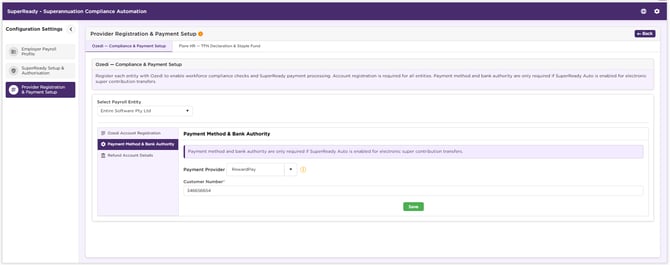
- Provide the Customer Number (RewardPay Customer ID).
- Click Save.
How does RewardPay Work?
- Payment processing is initiated through the Ozedi Superannuation Service.
- The employer is redirected to the RewardPay website.
- The employer signs in to their RewardPay account.
- The employer reviews and authorises the payment, including selecting the credit card to use.
- RewardPay and American Express perform the required credit and verification checks.
- Once approved, the funds are processed and distributed to the relevant superannuation funds.
Important Notes:
- All credit card authorisation and verification are completed on the RewardPay website.
- Ozedi does not store or have access to any credit card details.
- Payment approval is subject to American Express credit assessment and approval.
- Processing timelines may vary based on card approval and settlement.
- This method is suitable for clients who prefer credit-based payments or need cash flow flexibility.
When to Use RewardPay
RewardPay is suitable when:
- You prefer to pay using a credit card (American Express).
- You require cash flow flexibility.
- Automated (PayTo) or bank transfer (Zepto Transfer) options are not preferred.
Refund Account Details
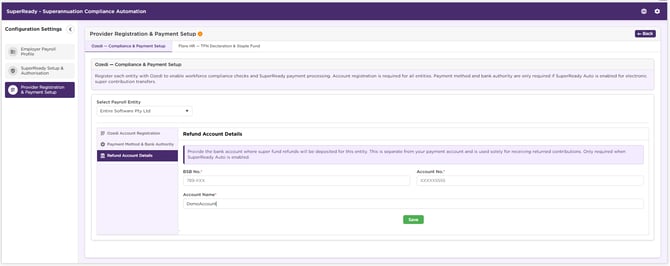
The Refund Account Details section captures the employer’s nominated bank account where refunds from superannuation funds will be deposited for the selected entity.
If a super fund returns a payment (for example, due to incorrect member details or overpayment), the refunded amount will be credited to this bank account. This is separate from your payment account and is used solely for receiving returned contributions. Only required when SuperReady Auto is enabled.
How to set the Refund Account Details?
- Select Payroll Entity.
- Provide BSB Number, Account No., and Account Name.
- Click Save.
- Once saved, all the fields are displayed in read-only mode.
You can click Edit to update the required Refund Bank Details and click Save.
How to Change the Payment Provider?
Once a payment provider is selected and saved, it cannot be changed directly within the system.
If you need to update or change the selected payment provider, please contact the Xeople Support team. The team will assist you with the required steps and make the necessary changes on your behalf.
Related articles: