
This section explains how administrators can remove a user’s access to their configured authenticator app. Revoking access forces the user to set up the Authenticator App again the next time they sign in. This action is typically used when the user has changed devices, lost access to their authenticator app, or requires a reset for security reasons.
If you are not an administrator, please contact your system administrator to revoke or regain access.
To revoke access to the authenticator app, follow these steps:
- In the main header, click Masters.
- Under Main Masters, select Entire OnHire Users.

Masters- Main Masters – Entire OnHire Users
- Locate the user and click Revoke.
- Confirmation message will appear. Once confirmed, the user’s authenticator app access is revoked and must be set up again during the next sign‑in.
Recommend Reading: How Entire OnHire Users Masters and User Authorisation works, click here: Entire OnHire Users, Main Masters - Users Authorisation.
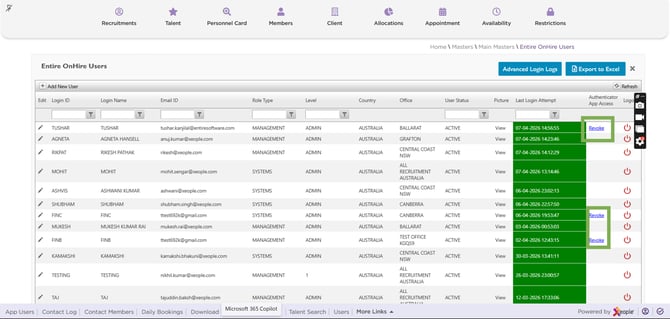
Entire OnHire Users – Authenticator App - Revoke