
The Internal Users master allows you to view and manage all internal staff accounts, including their login ID, login name, contact details, role type, level, location, login status, authenticator app access, etc. It also lets you create new users and log out existing users.
Your licence count is based on how many users can be logged in at the same time. To read more on licence check, click here: X.1 - Enhancements - Staff Portal.
To navigate to the Entire OnHire user master, follow the steps below:
- Click on Masters on the main header.
- Under Main Masters, select Entire OnHire Users.
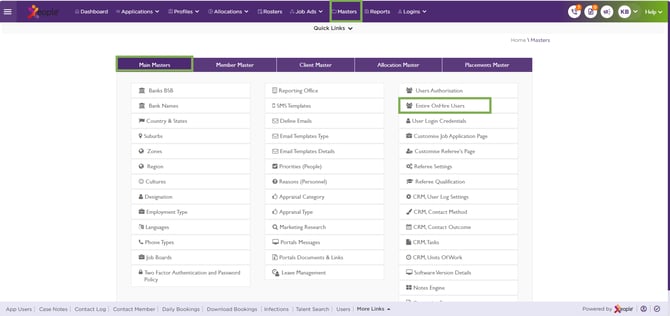
Masters – Main Masters – Entire OnHire Users
- The users landing screen appears.
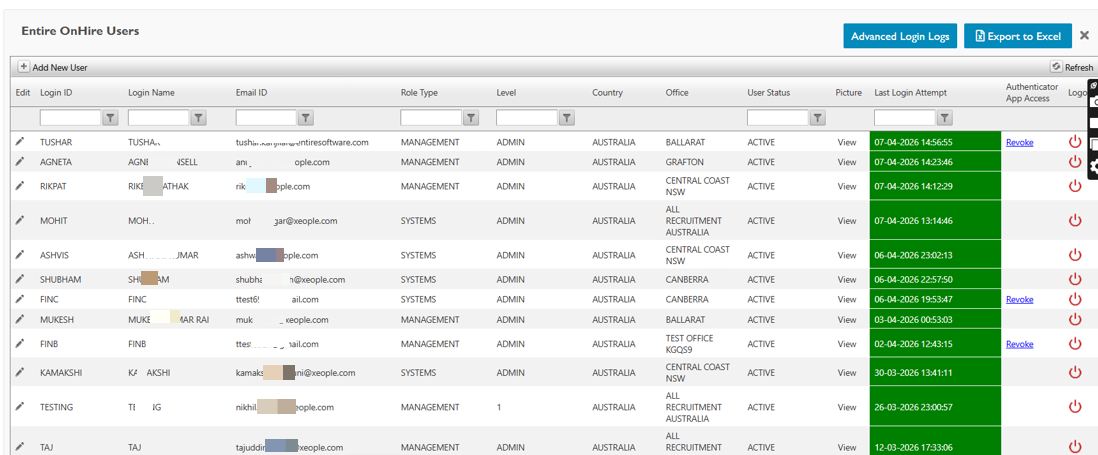
Entire OnHire Users
From this screen, you can:
Recommend Reading: How role type and access levels work, click here: User Authorisation.
Back to Top