
A roster is an organised schedule that allocates members to specific shifts over a defined period such as a day, week, or month. It consolidates all planned shifts and their designated members, ensuring proper coverage, balanced workloads, and smooth operational efficiency.
Roster Overview:
- Displays shifts extracted from the source.
- Shows which members are allocated or unallocated.
- Helps schedulers plan staffing levels.
- Reflects real-time availability, assignments, and status updates.
Rosters Clubbed in One Calendar View:
- Shift Roster (Work Schedule): A timetable showing when each member works, often used in industries with casual shifts (e.g., healthcare, hospitality).
Shift: A shift is a set block of time that a person works, such as 9 am–5 pm or an overnight shift. For example, a nurse may work the morning shift (7 am–3 pm) or the night shift (11 pm–7 am). All shifts and related data are fetched from the source (default: EOH). Any changes made in the calendar automatically sync back to the source, ensuring real-time accuracy.
Recommend Reading: How to configure shift type (like AM, PM, NS, etc) in EOH, click here: Allocation Master - Member Shifts.
Calendar View
The Calendar View shows shifts in a simple, visual way based on service location, delivery location, member, and shift type. It helps you quickly see who is working, when, and where, making scheduling and planning much easier. In Card View, each shift appears as a clear, easy-to-read card on the calendar. These cards show key details at a glance, so you don’t have to open each shift to understand it. Example: You can view all shifts for a service or delivery location this week, or quickly check a member’s schedule for the day, week, or month—just by looking at the cards on the calendar.
Recommend Reading: How to publish shift(s) to multiple members or the mobile app, click here: Broadcast vs. Released Shifts.
Types of Placements and Shifts
- Casual Shifts: Members work on an as-needed basis without fixed hours. Shifts are often ad hoc, depending on demand, and booked one at a time. Usually managed by recruiters/agency.
- Unmanaged Jobs: Members work for a defined period or project with pre-scheduled shifts (e.g., three weeks, Mon–Fri, 9–5). Usually managed by recruiters/agency.
Recommend Reading: The calendar view is a replication of the client allocation, displayed in a calendar format. How the client allocation screen works and the actions you can perform on it. Click here: Client Allocation.
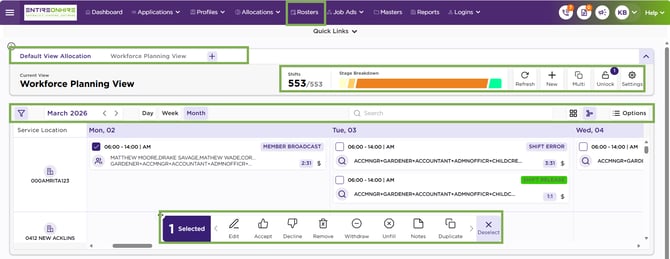
Roster – Calendar View
Calendar View Navigation
To navigate to the calendar view, follow the steps:
- Upon login to EOH, you will see the Home page.
-
Click Rosters from the main panel or select Rosters under Quick Links.
- This will open the Calendar View.
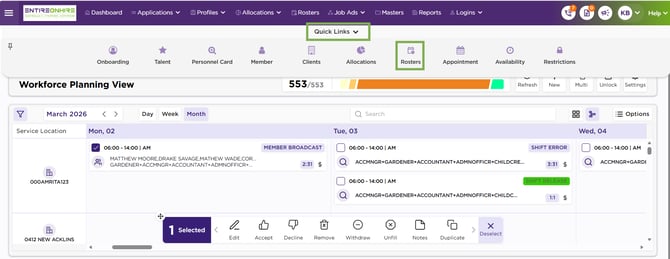
Quick Links – Roasters – Calendar View