New Invoice Template Added: Template 4 – Summary with Registration Number (Shift with Qual Registration)
Purpose:
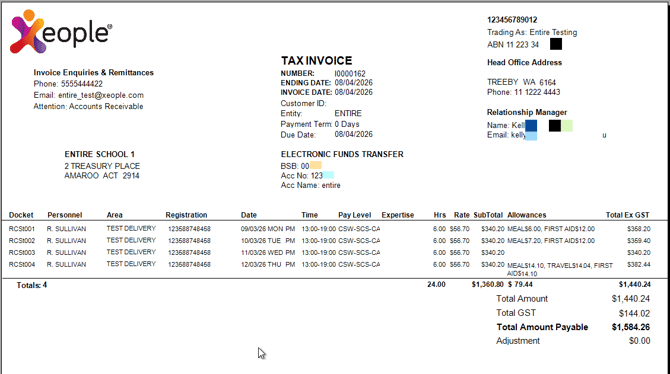
A summary format for clients who prefer to display Registration and Pay Level details alongside shift information for staffing and invoicing requirements.
Features:
-
Includes Docket Numbers, Personnel, Pay Level, Allowances, and Expertise.
-
Displays Shift Dates, Times, Hours, Rates, and Subtotals.
- Totals are clearly summarised with Amount, GST, and Adjustments.
Best For:
Clients who require professional registration and pay level visibility alongside shift or assignment details within a compact and compliance-focused invoice layout.
Registration Details
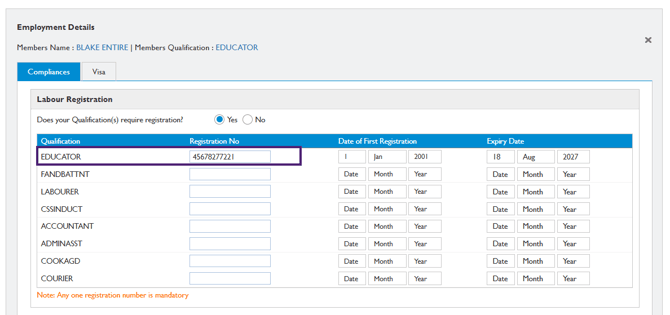
The registration number displayed on the invoice is sourced from Compliances → Labour Registration within Employment Details in the Staff Portal (as shown in the figure below). When a shift is associated with a qualification, the system displays the registration number linked to that qualification. For example, if the shift requires the Educator qualification, the invoice displays the registration number associated with the Educator qualification recorded in the Labour Registration section.
Note: Registration is included on the invoice only when a registration number is associated with the qualification assigned to the shift.