Content
Tax Scale Transition Rules: WHM and Australian Resident
Invoice Details Configuration by Entity (Multi-Company Setup)
1. Tax Scale Transition Rules: WHM and Australian Resident
a. Members will no longer be restricted from changing their tax scale from Working Holiday Maker (WHM) to SAW (Australian Resident)
A member who has worked as a Working Holiday Maker (WHM) is permitted to transition to the SAW (Australian Resident) tax scale within the same financial year. Once this transition occurs, the member will be treated as an Australian resident for all subsequent work and associated processing for the remainder of that financial year.
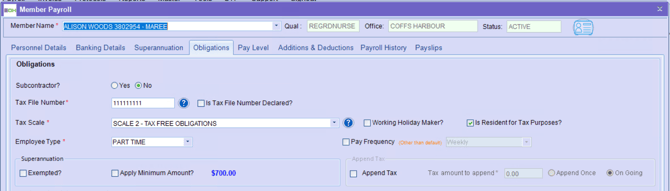
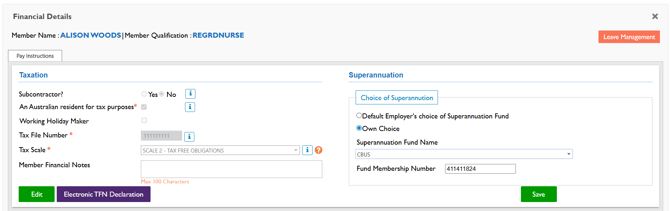
Members can declare/ update their tax scale via the Finance Portal and Staff Portal. This change is allowed even if a pay run has already been processed under the WHM tax scale during the current financial year.
Update Tax Scale in the Finance Portal → Member Payroll
Update Tax Scale in the Staff Portal → Member → Tax Information
However, if a member has already worked as an Australian Resident (SAW) tax scale (with a pay run completed), they will be restricted from changing their tax scale back to a WHM tax scale in the current financial year. This restriction ensures compliance with applicable taxation rules while allowing valid transitions from WHM to Australian Resident status within the same financial year.
b. How YTD Data is Created for WHM and SAW Income Types?
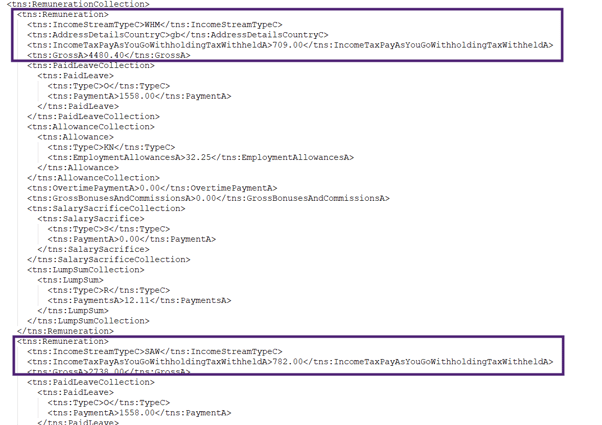
For members with earnings under both the Working Holiday Maker (WHM) and Australian Resident (SAW) tax scales in the same financial year, YTD data is maintained separately for each income type.
- WHM YTD amounts are stored independently.
- SAW YTD amounts are calculated by excluding WHM figures from the overall YTD totals.
- Deduction Collection and Superannuation remain common for both income types.
- Salary Sacrifice is tracked separately for WHM and SAW.
The XML output reflects these separate YTD figures, ensuring accurate reporting, compliance, and clear representation of member earnings for both income types.
c. Finance Reporting
All financial reporting will remain unchanged. The only change applies to the STP XML file, which will now display individual Year-to-Date (YTD) details separately for each applicable income type as explained above.
2. Invoice Details Configuration by Entity (Multi-Company Setup)
The Display Entity Info on Invoices setting can now be configured for multiple entities, allowing greater flexibility in invoice branding per branch.
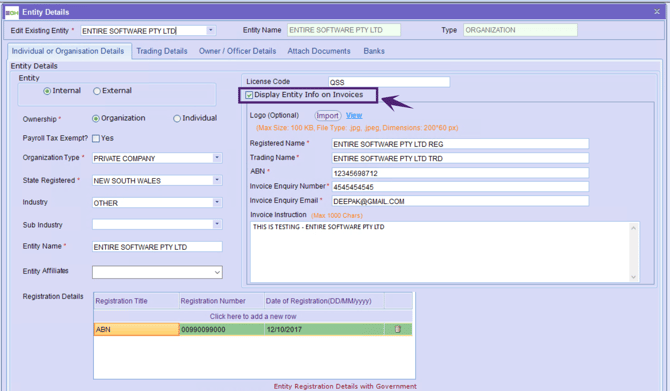
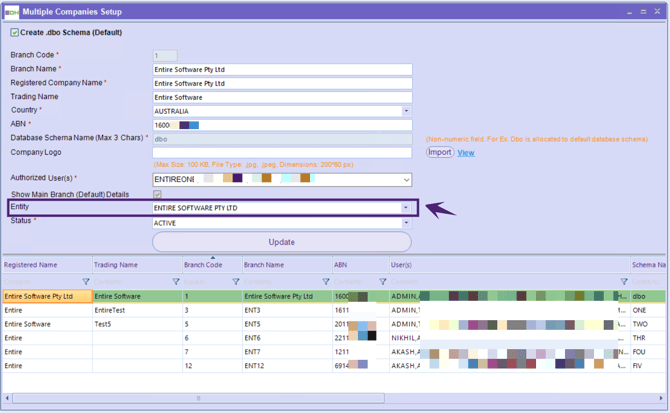
In the Multiple Companies Setup screen, a new Entity drop-down is introduced, listing all configured entities. By default, no entity is selected.
How It Works?
- Select the Entity corresponding to a specific branch.
- When generating a client invoice for the selected branch, the system checks whether Display Entity Info on Invoice is enabled in the Entity Details screen.
- When Display Entity Info on Invoice is selected: All invoice details for the selected branch are sourced from the Entity Details screen, including:
- Logo
- Registered Name
- Trading Name
- ABN
- Invoice Enquiry Number
- Invoice Enquiry Email
- When Display Entity Info on Invoice is not selected: Invoice details are derived from a combination of:
- Multiple Companies Setup Screen
- Application Option Settings Screen
Important Note
If no Entity is selected for a branch in the Multiple Companies Setup screen, the system will continue to function as per the existing behaviour (no changes applied).