Content
Weekly/Yearly Performance Graph - Dynamic Year Range (Last 16 Years + Current Year)
Finance Portal - Annual Leave Units Displayed Correctly in the Member's Payslip
Configure Email Notification for Member Uploaded Document
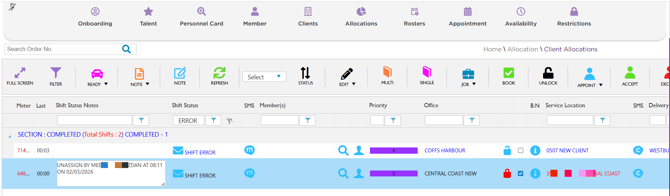
Client Allocations - Shift Status Changed to Shift Error for Unassigned Shift
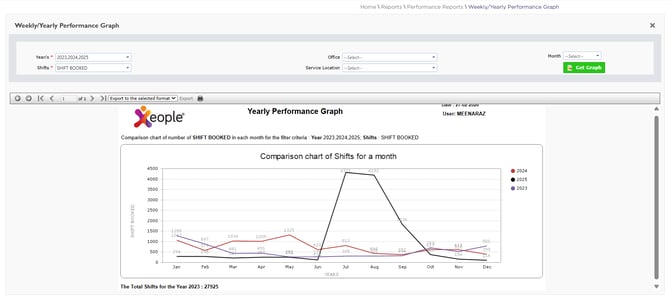
1. Weekly/Yearly Performance Graph - Dynamic Year Range (Last 16 Years + Current Year) - ✅ Resolved
Issue resolved. In Reports → Weekly/Yearly Performance Graph report, the Year(s) field now dynamically displays the last 16 years along with the current year for selection in the Staff Portal.
The selected year(s) are used to generate a comparative monthly chart of shifts based on the applied filters.
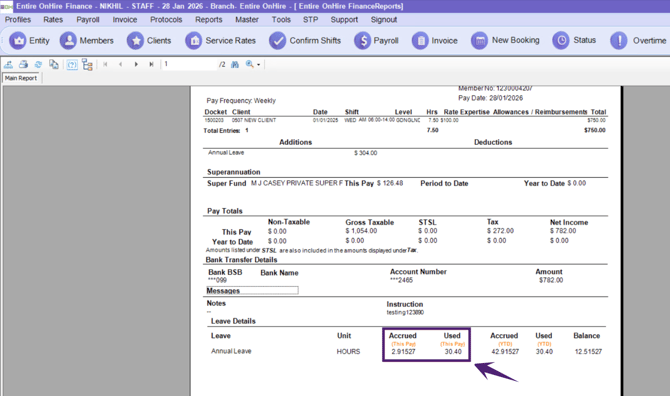
2. Finance Portal - Annual Leave Units Displayed Correctly in the Member's Payslip - ✅ Resolved
Issue resolved. In the Finance Portal, Annual Leave units are now accurately displayed in the member’s payslip, ensuring correct leave balances and reliable payroll records.
 l
l
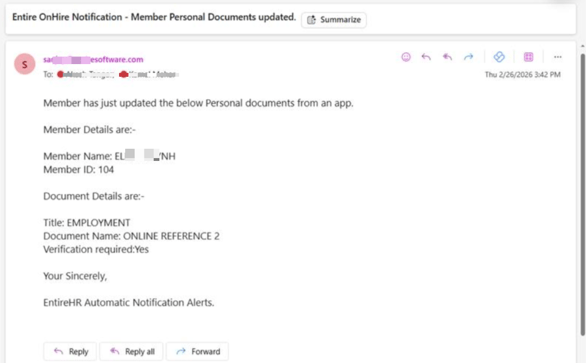
3. Configure Email Notification for Member Uploaded Documents - ✅ Resolved
Issue resolved. When a member uploads documents through the Workforce App (via document), an email notifications are automatically sent to the member. With this update, notifications can now be configured to be sent to staff by nominating a dedicated booking email address.
This update provides timely alerts for member-uploaded documents, enabling staff to proactively monitor and track expiring or newly submitted documents. Email notifications are triggered only when a document is uploaded by a member.
To enable staff email notifications, provide the dedicated booking email address to Xeople Support (support @xeople.com) so it can be configured to receive alerts for member-uploaded documents.
4. Client Allocations - Shift Status Changed to Shift Error for Unassigned Shift - ✅ Resolved
Issue resolved. Unassigned shifts can now be successfully updated to the Shift Error status in the Client Allocations of the Staff Portal.