
Content
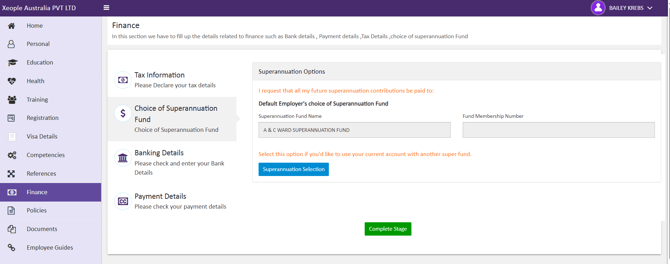
Superannuation Details Saved Successfully for Applicants Using an Existing Email Address
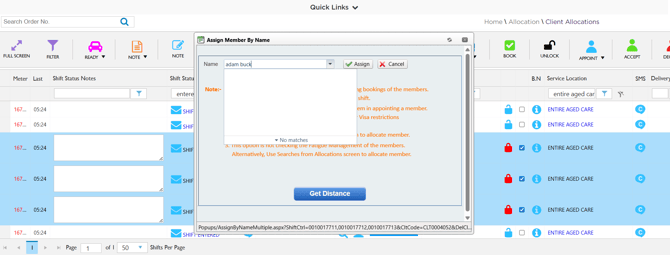
Restricted Members are not Displayed for Multiple Shift Selection
Client Portal: Shift Notification Alerts are Triggered Correctly for Member and Staff
Employment Status Notes Retains Formatting in the Personnel Card of the Staff Portal
Client Compliance - Copying Rules Between Service Locations with Successful File Downloads
Members Correctly Mapped in Case Notes for Shifts
Shift Match - Shift Date Displayed Correctly for all Shifts
Contact Log - Correct Member Name Displayed for 'BY SMS' Contact Method
Finance Portal - Timesheet Images Displayed with Clarity
Finance Portal - KMS Unit Allowance Now Calculates Pay Amount ($) Accurately
1. Superannuation Details Saved Successfully for Applicants Using an Existing Email Address - ✅ Resolved
Issue resolved. In the Applicant Portal, applicants can now successfully save their Superannuation details (including Profile ID and Superannuation information) even when using an email address that already exists in the system. The system now checks:
-
If the email address belongs to the same applicant, their Profile ID and Superannuation details are updated and saved successfully.
-
If the email address is associated with multiple users, an alert is displayed 'Email is already in use.'
This ensures accurate updates while preventing conflicts caused by duplicate email usage.
2. Restricted Members are not Displayed for Multiple Shift Selection - ✅ Resolved
Issue resolved. In the Client Allocations section of the Staff Portal, members who are restricted to the selected Service Location and Delivery Location are now excluded from the selection list when assigning to multiple shifts. This ensures that restricted members cannot be assigned to multiple shifts.
3. Client Portal: Shift Notification Alerts are Triggered Correctly for Member and Staff - ✅ Resolved
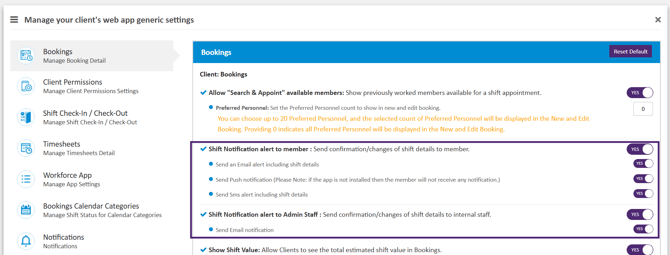
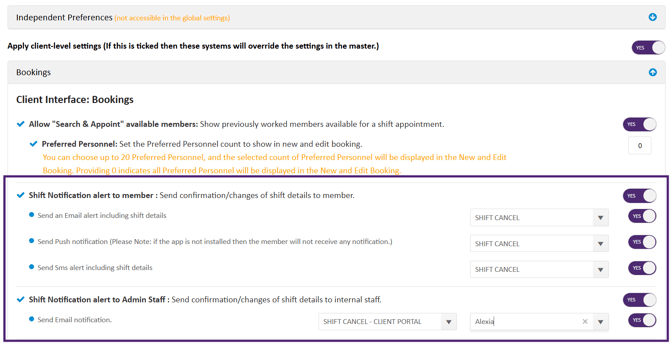
Issue resolved. Shift Notification alerts are now successfully sent to the members and admin staff when shifts are accepted, edited, or cancelled from the Client Portal. Notifications are triggered based on the configurations defined in both the Global Master Settings and the Client Level Master Settings.
Note: The ‘Yes’ flag indicates that the system is configured to send shift confirmation details to the member/staff.
Global Master Settings displays flagged Shift Notification alerts for Members and Admin Staff
Client Level Master Settings displays flagged Shift Notification alerts for Members and Admin Staff
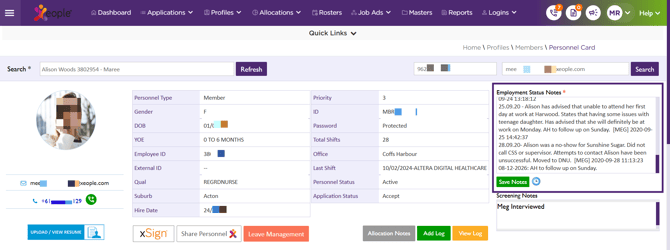
4. Employment Status Notes Retains Formatting in the Personnel Card of the Staff Portal - ✅ Resolved
Issue resolved. In the Personnel Card, the Employment Status Notes consistently retain Line Breaks and formatting as provided by the staff in the Staff Portal.
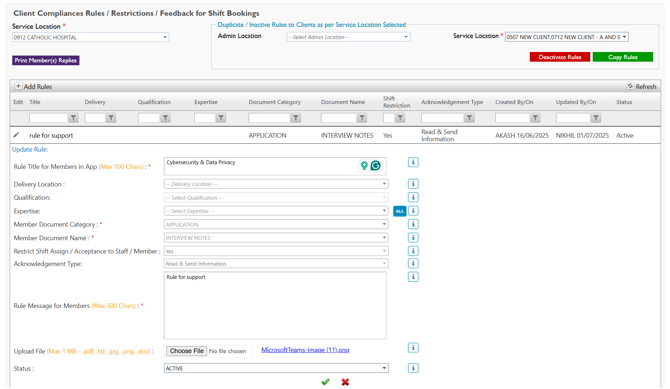
5. Client Compliance - Copying Rules Between Service Locations with Successful File Downloads - ✅ Resolved
Issue resolved. In Profiles → Clients → Client Compliances of the Staff Portal, you can now reliably copy rules between service locations. All files attached to those rules are retained during the copy process and can be downloaded successfully from the new service location, ensuring continued access to supporting documents without re-uploading.
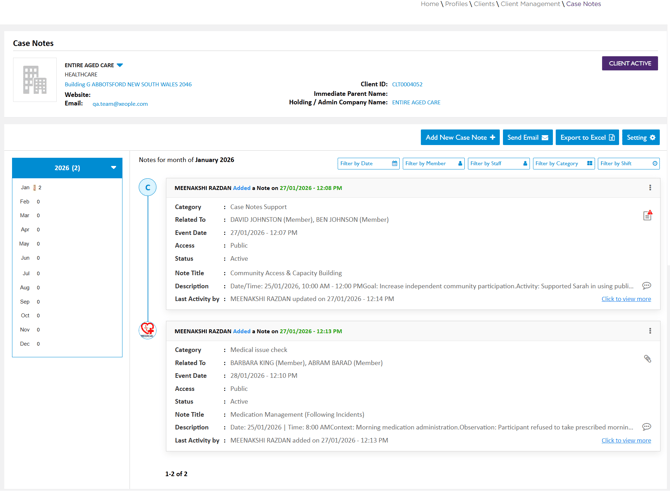
6. Members Correctly Mapped in Case Notes for Shifts - ✅ Resolved
Issue resolved. In the Staff Portal under Clients → Client Management → Case Notes, members are now correctly mapped to the Case Notes associated with their shifts. This ensures shift-related case notes are accurately displayed, enabling clients to easily review and audit shift details.
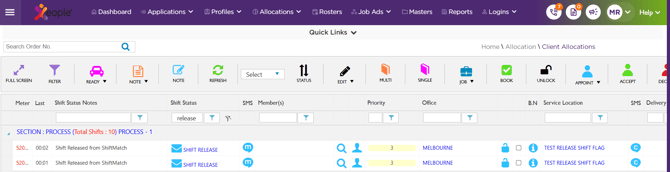
7. Shift Match - Shift Date Displayed Correctly for all Shifts - ✅ Resolved
Issue resolved. When shifts are mapped from the EOH Shift Match Portal to the Staff Portal, the correct location and shift date are now consistently retained. Shifts now display the accurate location and shift date on both the Client Allocations page of the Staff Portal and the EOH Shift Match portal, ensuring alignment between systems and eliminating allocation errors.
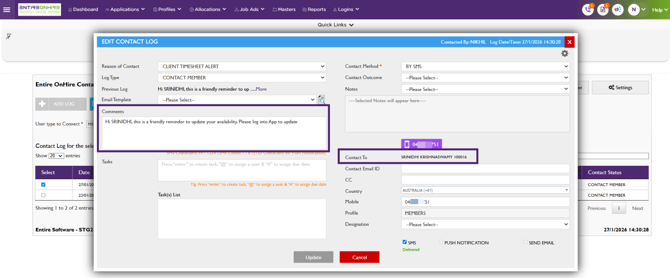
8. Contact Log - Correct Member Name Displayed for 'BY SMS' Contact Method - ✅ Resolved
Issue resolved. In the Contact Log, when sending an SMS using the ‘BY SMS’ Contact Method, the correct member name is now displayed and used in the delivered message.
Additionally, in both Add Contact Log and Edit Contact Log, the correct member name is consistently shown in the ‘Contact To’ field and within the Comments section, ensuring accurate and reliable communication records.
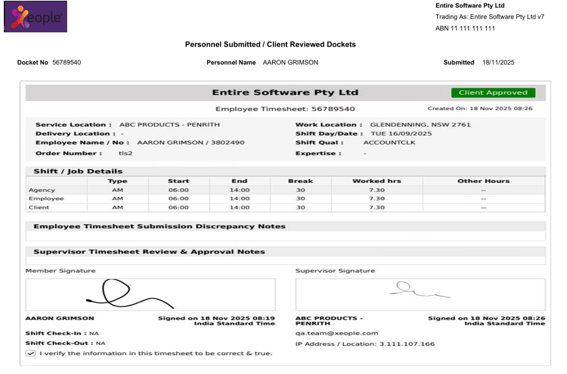
9. Finance Portal - Timesheet Images Displayed with Clarity - ✅ Resolved
Issue resolved. In the Finance Portal, timesheet images are now displayed with clarity, ensuring all details are easily readable and supporting accurate review, download, and sharing of timesheets.
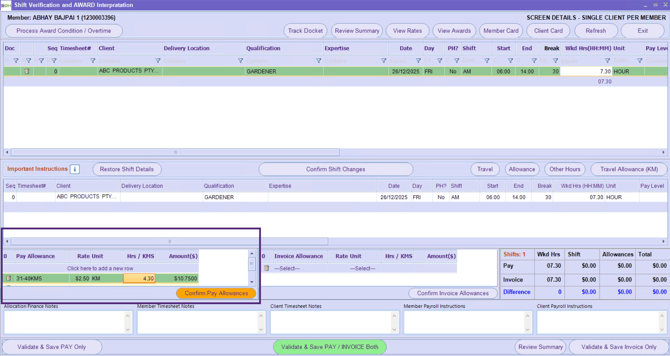
10. Finance Portal - KMS Unit Allowance Now Calculates Pay Amount ($) Accurately - ✅ Resolved
Issue resolved. In the Finance Portal → Shift Verification and Awards Interpretation screen, the Pay Allowance for a member is now calculated accurately when the KM unit is selected. The allowance amount is calculated using the formula: 'Amount ($) = Rate × KMS.'
This ensures that payments are correctly applied based on the distance travelled.
Related Articles:
X.1.1 Release Notes - December 2025X.1.1 - Enhancement - Staff Portal
X.1.1 - Enhancement - Finance Portal