
Content
Member Fatigue Management - Enhanced Identification of Sleepover Shifts
Member Fatigue Management - Enhanced Identification of Sleepover Shifts
The Member Fatigue Management feature has been enhanced to identify Sleepover Shifts and apply the correct fatigue management rules when shifts are created or updated. Shifts are now classified based on the presence of sleepover hours or a sleepover shift type, ensuring the appropriate gap rules are consistently applied for contiguous (back-to-back) shifts.
These fatigue rule checks apply across the Staff Portal, Workforce App, New Client Portal, and Old Client Portal.
Case 1: When sleepover hours are added to an Active Shift, the shift is classified as a Sleepover Shift.
When the sleepover hours are added in the Additional Details of an Active Shift, the system will automatically classify the shift as a Sleepover Shift.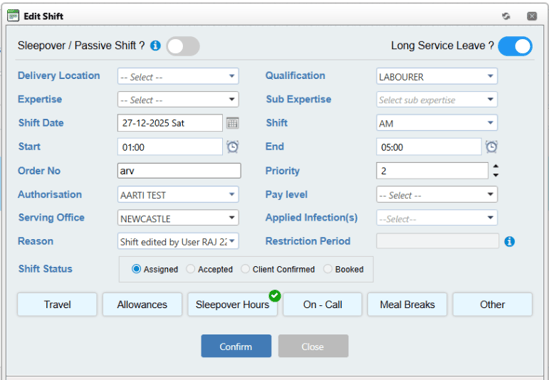
As this shift includes sleepover hours in the Additional Details, the 'Hours gap between Contiguous Sleepover shifts' rule will be applied.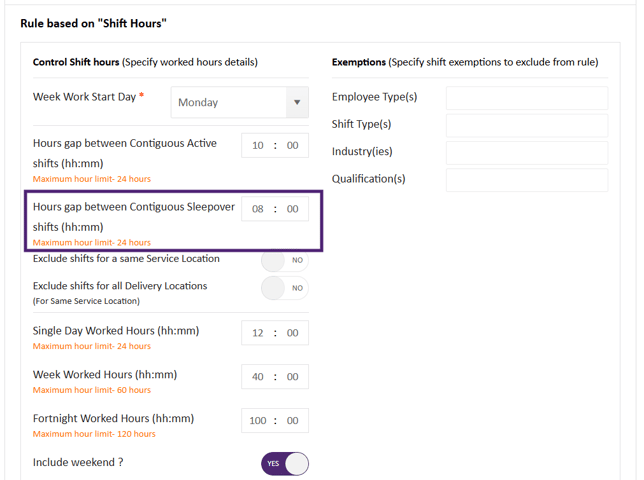
Case 2: When the user adds Sleepover Shift Type or Sleepover Hours to a Contiguous Active Shift
When an existing active shift does not include a sleepover shift type or sleepover hours, and a new contiguous shift is created that either:
- has a Sleepover Shift Type, or
- includes Sleepover Hours,
This new shift will be classified as a Sleepover Shift.
As this new contiguous shift includes sleepover shift type/ sleepover hours, the 'Hours gap between Contiguous Sleepover shifts' rule will be applied.
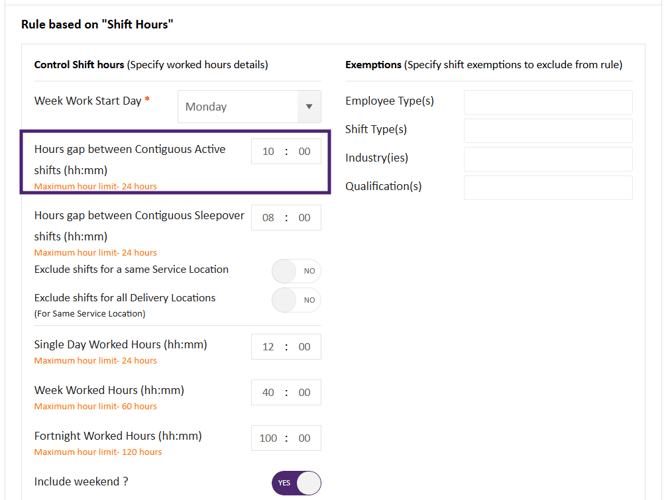
Case 3: The 'Hours gap between Contiguous Active Shifts' rule will apply only when:
- The existing shift is an Active shift with no Sleepover shift type or Sleepover hours; and
- The new contiguous shift is also an Active shift with no Sleepover shift type or Sleepover hours.
Related Articles:
X.1.1 Release Notes - December 2025X.1.1 - Enhancement - Finance Portal
X.1.1 - Resolved Issues