
When generating payslips, you may encounter the error "Superannuation details does not exist for Member." This occurs when the member's superannuation obligation has not been selected in their payroll profile. This article explains the cause and provides step-by-step instructions to resolve the issue.
Error Message ExampleThe error appears in the payslip generation grid, flagged in red against the affected member's record:
"Superannuation details does not exist for Member."

Cause
This error occurs when the SUPER obligation checkbox is not ticked under Additional Tax & Superannuation Obligations in the member's payroll profile. Without this selection, the system has no superannuation obligation to allocate to the member's payslip.
How to Fix:- Click the Member tab.
- Open the relevant member's Payroll profile.
- Select the Obligations tab.
- Under Additional Tax & Superannuation Obligations, tick the checkbox next to SUPER.
- See screenshot below.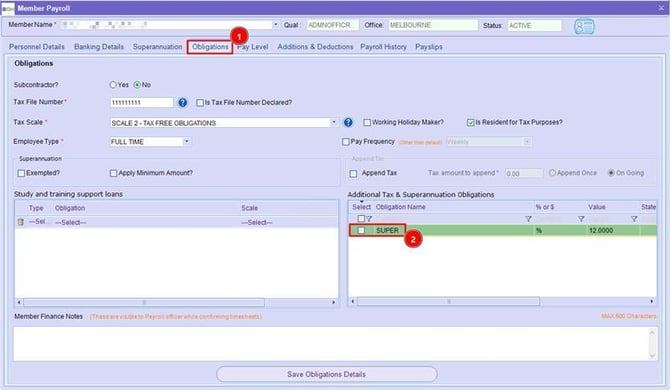
- Click Save Obligations Details.
- Retry generating payslips for the member.
Once the SUPER obligation is selected and saved, the system will correctly allocate superannuation, and the payslip can be generated without error.