
You can withdraw a shift using either of the two methods below:
Method 1: Use the Status Dropdown
- Select the shift(s) you want to withdraw.
- Open the Status drop-down.
- Choose Client Withdrawn.
- Click Update Status.
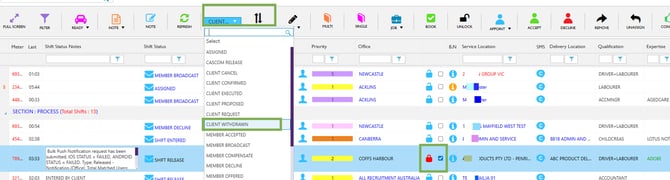
Select Shift – Client Withdrawn – Update
Method 2: Use the Withdraw Button
- Select the shift(s) you want to withdraw.
- Click the WITHDRAW button in the top header.
- Fill in the required details (Professional Name and Reason) in the confirmation popup.
- Click Yes to confirm.
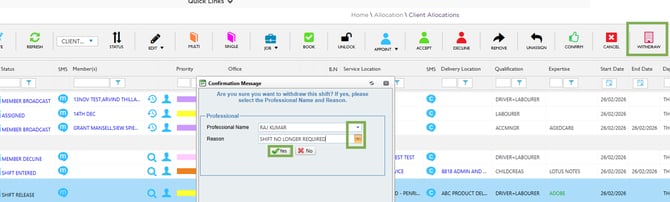
Select Shift – Withdraw – Confirm
Recommend Reading: How you can withdraw a shift from the calendar view, click here: Withdraw - Shift Action Bar.