
You can choose and update your superannuation fund yourself, straight from the Workforce App. Here's how.
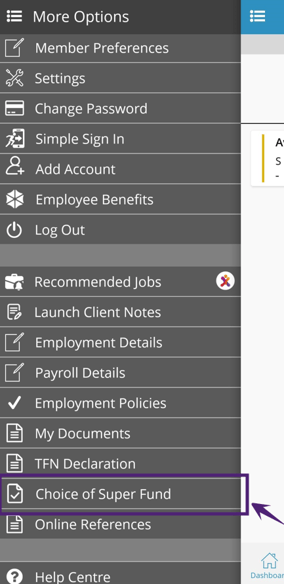
Step 1 – Open the Choice of Super Fund
- Tap the menu (☰) icon in the app.
- Select Choice of Super Fund.
Step 2 – Complete your tax details (if asked)
- If you haven't entered your tax details yet, a prompt will appear. Tap OK and fill in the Tax Information tab.
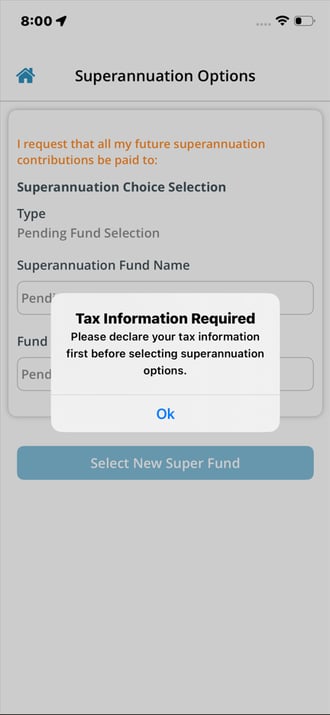
- You'll need this done before you can choose your super fund.
Step 3 – Choose your super fund
On the Superannuation selection screen, pick the option that suits you:
- Default Fund – your employer's default super fund.
- Existing Fund – your own existing super fund.
- Self-Managed Fund (SMSF) – if you have a self-managed super fund.
- Stapled Fund – your existing fund that follows you between jobs (your employer can look this up with the ATO if you don't choose one).
Step 4 – Confirm your choice
- Once you select a fund, it's saved and will be used for all your future super contributions.
Changing your fund later
- Open Choice of Super Fund again — your current fund is shown.
- Tap Superannuation Selection to choose a different fund.
Checking your status
- Tap your SuperReady Status to see whether your super details are set up and ready to go.